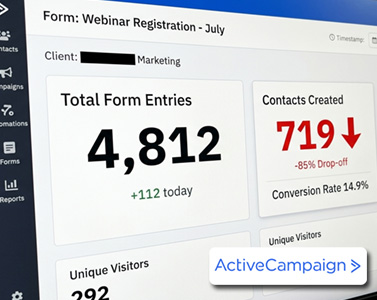
Picture this: your form has racked up 400 entries, but only 61 contacts actually made it into your account. That’s over 85% of your potential leads gone — vanished before a single automation ever fired. If that number sounds painfully familiar, you’re not alone. ActiveCampaign form mistakes like this one are quietly draining conversions for thousands of marketers who assume their forms are working perfectly simply because traffic is flowing in.
The good news? Every one of these leaks is fixable in minutes once you know where to look. Below are the seven most common ActiveCampaign form mistakes, exactly where to find each setting, and the specific fixes that actually work.
1. Using the Wrong Opt-In Strategy
By default, ActiveCampaign turns on double opt-in for every email list form you create. That means new contacts land in your account as Unconfirmed until they click a confirmation link. If they never click it, they never become Active — and an unconfirmed contact can’t receive a single campaign, not even your welcome email.
Where to find it: In the form builder, go to the Options tab, click the pencil icon next to “Subscribes to List,” and look for the Opt-in Confirmation toggle.
The fix: Double opt-in isn’t inherently bad — it builds a cleaner list and reduces spam complaints. But if you’re running paid ads to a landing page or collecting contacts live at an event, that extra confirmation step kills conversions. Turn the toggle off and save so contacts are added as Active immediately. Match your opt-in setting to how that specific form is actually being used, not to a one-size-fits-all default.
2. Skipping Spam Protection
AI-driven bots are submitting forms with fake addresses and convincing-looking names every day. Since late 2025, ActiveCampaign charges for all contacts — including unconfirmed ones — which means spam submissions are literally costing you money on top of cluttering your list.
The fix: Drag the captcha field from the Fields panel directly onto your form. This triggers a Google reCAPTCHA challenge that bots can’t pass. One important caveat: captcha is only available on inline forms, not modal or floating form types, so plan your form layout accordingly.
3. No Attribution Tracking
Your form might be capturing an email address, but if it’s not capturing where that person came from, you’re flying blind on which campaigns actually produce customers.
The fix: Go to Contacts → Fields and create custom hidden fields for utm_source, utm_medium, and utm_campaign. Then open your inline form, navigate to Fields → Custom Fields, and drag each UTM field onto the form. Double-check that each field’s personalization tag uses underscores so it matches the URL parameter format exactly. Once set up, anyone arriving from a tagged URL has their traffic source automatically stored on their contact record — a must-have if you’re running any paid traffic.
4. A Thank-You Page That’s a Dead End
Most forms show a generic confirmation message and stop there, wasting the most engaged moment in the entire customer journey.
The fix: In the Options tab, switch from “Show a message” to Open a URL, and send people to a real thank-you page that confirms what they signed up for and tells them exactly what happens next. Then check your automation: your first email needs to fire with zero delay, not 24 hours later. By then, the person has forgotten who you are and your email looks like cold outreach instead of a warm follow-up.
5. Broken Trigger Logic
This is one of the sneakier ActiveCampaign form mistakes because everything looks fine on the surface. Open your form automation and check the Run setting on the trigger. If it’s set to “Run once,” returning contacts who submit the form again will never re-enter the automation — they simply fall through the cracks.
The fix: Change the trigger to Run multiple times, then add an If/Else condition at the top: if the contact is already active, route them to a re-engagement path; if they’re new, send them through your normal welcome sequence. It’s also worth adding an engagement check after your first two emails — if a contact hasn’t opened or clicked anything, build in an exit branch, since continuing to send to unengaged contacts hurts your deliverability.
6. A Poor Mobile Experience
If you’ve never tested your form on a phone, you’ve probably never seen how many leads it loses there.
The fix: Open the mobile view of your browser and check that fields are large enough to tap, the submit button is full width, and the form doesn’t require excessive scrolling. Use a font size of at least 16 pixels on your button text, keep the headline to two lines max on a phone screen, and limit your fields to email only — or email plus first name.
7. Never Checking Your Form Statistics
You can’t fix what you don’t measure. Click into any form’s stats page and check the gap between Total Entries and Contacts Created. Scroll to Recent Contacts and click through individual records to check their status, whether tags applied correctly, and whether their automation actually fired.
The fix: Make this a recurring habit. This five-minute audit, done at least once a month, can catch broken triggers and confirmation issues before they cost you hundreds of leads.
Quick Recap of the 7 ActiveCampaign Form Mistakes
- Wrong opt-in setting — match it to your traffic source.
- No spam protection — add captcha to block bots.
- No UTM tracking — add hidden attribution fields to every form.
- Weak thank-you flow — redirect to a real page and send your first email immediately.
- Bad trigger logic — allow re-runs and add engagement checks.
- Poor mobile experience — test it, simplify it, make it tappable.
- Ignoring your stats — turn the audit into a monthly habit.
Final Thoughts
Avoiding these ActiveCampaign form mistakes isn’t about overhauling your entire funnel — it’s about closing small, specific gaps that are quietly costing you leads every single day. Pick your highest-traffic form, open it right now, and work through this list. Each fix takes minutes, but cleaning up all seven will meaningfully increase the number of leads that actually make it into your automations instead of disappearing before they even get a chance to convert.
If this guide helped you spot a leak in your own forms, bookmark it and revisit it the next time you launch a new campaign — your future self (and your conversion rate) will thank you.